Think2Code Python Project Lab
Transform your Python coding skills into real-world software engineering. Build and deploy 5 complete standalone desktop, networking, and API applications 1-on-1 with developer mentors, and publish an impressive portfolio to GitHub.
Professional Software Stacks
Students learn the complete software development lifecycle: UI layout, event handling, network communication, persistence, and version control.
Desktop & Network Software Engineering
We bridge the gap between simple toy scripts and real standalone software that friends and family can use.
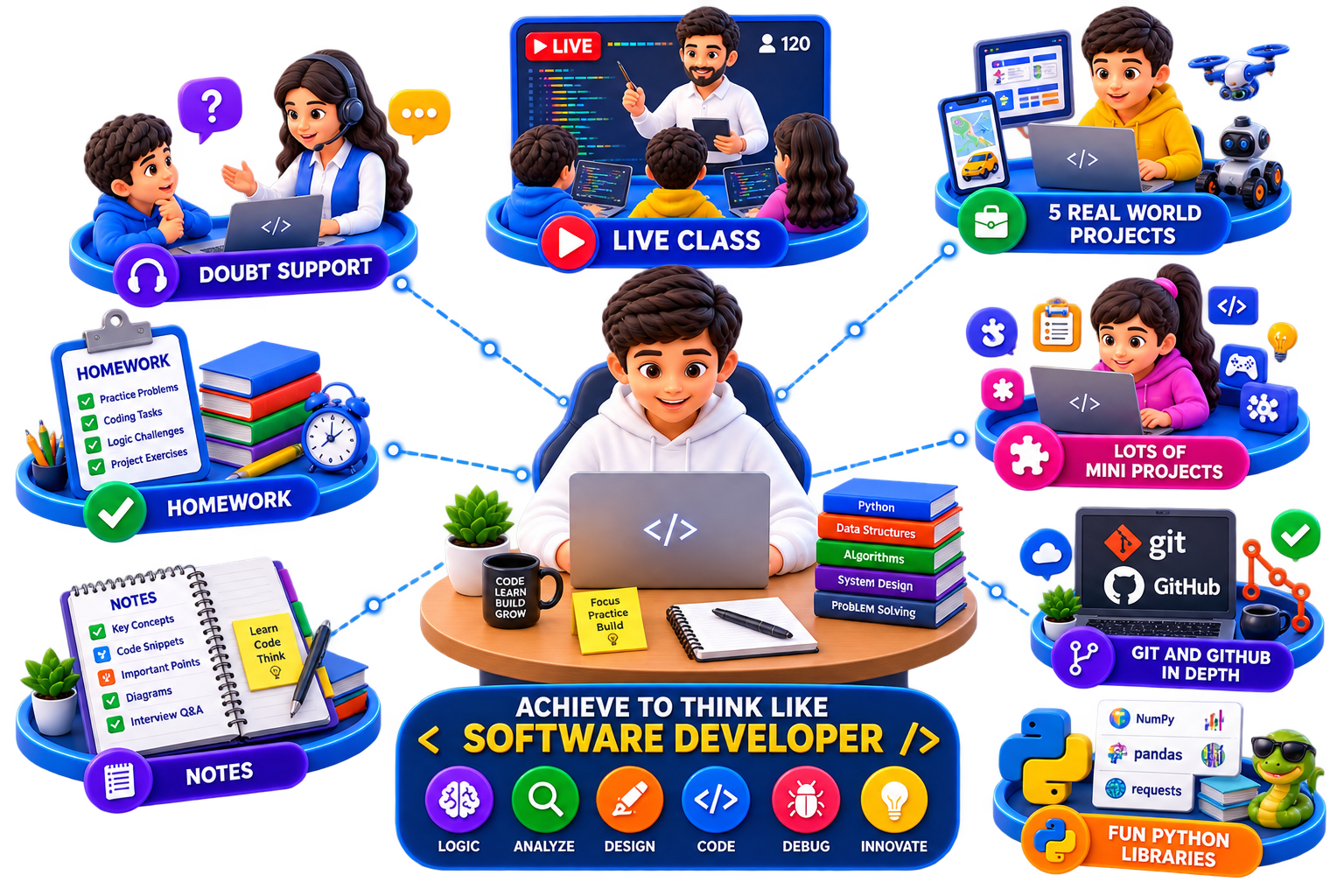
- Live Class — Interactive pair-programming video sessions building real applications from scratch.
- 5 Real World Projects — Complete standalone software: Canvas Drawing, Task Manager, Weather Radar, POS Billing, Socket Chat.
- Lots Of Mini Projects — Rapid prototyping drills with Pygame, Tkinter widgets, REST APIs, and automated bots.
- Git and Github in depth — Professional branch management, pull requests, commit trees, and repository documentation.
- Fun Python Libraries — Hands-on mastery of Requests, Tkinter, Sockets, Matplotlib, and JSON parsers.
- Doubt Support — Continuous developer assistance and interactive live screen-share debugging.
- Complete Week Assignment — Weekly feature sprints where students build and commit software modules.
- Best Notes — System architecture diagrams, UI design patterns, and network socket cheat sheets.
- Verified Certificate — Official Think2Code Software Engineering & Project Lab graduation credential.
5 Full Software Applications
Desktop GUI vector canvas, real-time live weather radar, socket chat messaging, billing automations, and task managers.
Live Class Curriculum Breakdown
A structured 8-week sprint taking students through 5 production-grade desktop and networking applications. Click on any week to view lesson topics.
Tkinter Fundamentals & Student Marks GUI
Tkinter Fundamentals
- Window setup & mainloop structure
- Basic widgets: Labels, Buttons & Entry inputs
- Geometry managers: Pack vs Grid vs Place
- Building simple interactive counter UI
Student Marks GUI
- Multi-input form design
- Percentage & grade calculation logic
- Dynamic text color alerts & pass/fail indicators
- Packaging first mini desktop app
Canvas Drawing & Paint App Project
Canvas Drawing
- Canvas coordinate system (X, Y)
- Binding mouse clicks & drag events
- Drawing lines, rectangles & circles
- Real-time mouse coordinate trackers
Paint App
- Multi-color palette selection
- Dynamic brush sizes & eraser tool
- Clear canvas & reset functions
- Exporting drawings to image files
JSON Persistence & Git/GitHub Integration
JSON + Persistence
- Reading & writing structured JSON data
- Storing user preferences & states on disk
- Exception handling during file I/O
- Local disk auto-save mechanism
Git + GitHub
- Git initialization, branches & commits
- Pushing local projects to GitHub repositories
- Writing professional Markdown README.md
- Setting up project showcase badges
Desktop Task Manager & Publishing
Task Manager
- Building desktop task manager UI
- Adding, editing & deleting task items
- Scrollable frame container architecture
- Status checkboxes & priority tags
Complete + Publish Task Manager
- JSON database sync on task completion
- Filter views: Active, Completed, Overdue
- Packaging and publishing to GitHub
- Month 1 Project Review & Report card
Real Software Pushed to GitHub
Click through the tabs below to explore the functional software applications built and compiled by students.
Canvas Drawing App
A desktop vector drawing application built from scratch with custom brush sizes, color selectors, coordinate pointer trackers, and image export.
Key Concepts Learned:
- Event handling & mouse position binding
- Tkinter Canvas Widgets & geometry objects
- Custom brush dimensions and color choices
- Python
- Tkinter
- Event Handlers
Schedule details & Pricing
Individual 1-on-1 mentorship for building real-world software engineering portfolios.
Duration & Commitment
2 Months total. 16 Live 1-on-1 classes (Saturday & Sunday), 70 minutes per class. Weekly coding homework & code reviews.
GitHub Code Portfolio
Every project is committed to GitHub with clean documentation, ready for college applications and internships.
Prerequisites
Basic familiarity with Python syntax (variables, conditionals & loops).
Think2Code Python Project Lab
- 8 Live 1-on-1 Interactive Classes / Month
- 5 Real Software Applications Shipped
- Tkinter GUI, REST APIs & TCP/IP Sockets
- Verified Certificate
No credit card required. Experience our platform risk-free.
Project Lab FAQs
Everything you need to know about our software portfolio sprint.